Your effects.
Your Studio.
Make your next look with effects, text and 3D. All in your browser.
US$10 / monthCheck current availability in StudioConverted prices are estimates. Billed in USD.
Already subscribed? Open Studio
Separate subscription. View current availability and manage your plan in Studio Web.


See EFX CHAIN Studio in action
Upload an image or video and start editing in Studio Web.
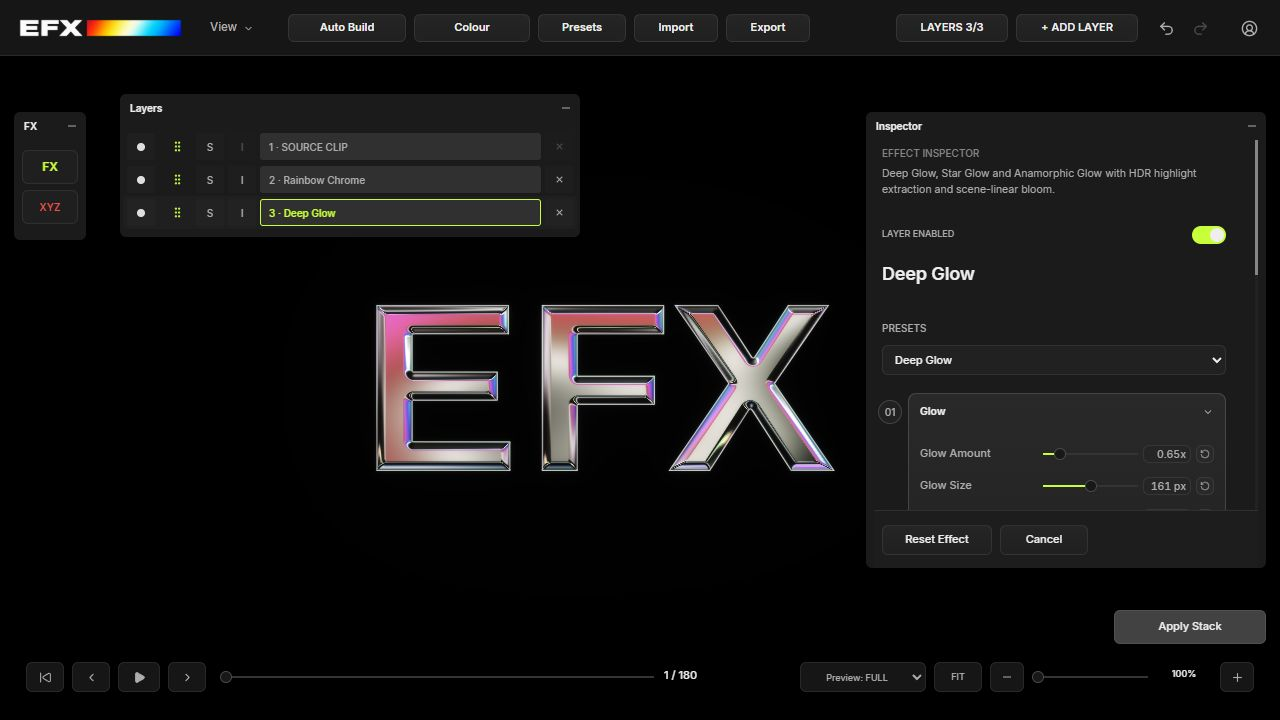
A silent Studio walkthrough showing Blobz tracking, CRT, Halftone, Colour, presets, 3D text and PNG import. Plays when in view. Click the video or press Enter or Space to pause or resume.
Coming soon
AI Studio
Start with a prompt. Connect images and video on one canvas.
Direct fal.ai pricingConnect your own fal.ai API key. fal bills you directly at its developer rates. EFX adds no generation fees or markup.See a cost estimate before generating when available.

-
Prompt
Two silhouettes, back to back. Cool cyan rim light against a silver backdrop.
-
Image generator
Image model
FLUX.2 Flash
Image size16:9
-
Generated image

-
Video generator
Video model
Seedance 2.5
Duration4 s
-
Generated video
Generate in AI Studio. Finish in Studio Web.
Send your generated image or video straight to the Studio Web canvas. Stack effects like VHS, ASCII and Deep Glow, fine-tune each layer, then export your finished edit.
Choose your desktop Studio.
Your effects, in the app you work in.
For DaVinci Resolve
EFX CHAIN Studio
US$100One-time purchase · billed in USDConverted prices are estimates. Billed in USD.
Choose your platform to check current availability.
For Adobe After Effects
EFX CHAIN Studio
US$100One-time purchase · billed in USDConverted prices are estimates. Billed in USD.
Choose your platform to check current availability.
Resolve and After Effects are separate one-time purchases. Studio Web is a separate subscription.
Inside the Studio.
35 effects. 10 components. All made to work together.
And the tools that tie it all together.
See what you can make.
Actual EFX CHAIN renders. Select a clip to see the effects in motion.
Built to stay editable.
Build your look in layers. Dial in every detail.
Keep the freedom to change your mind.
Find your
workflow.
Two plugins. One creative workflow. Build your look in Studio, or keep your everyday tools close with Tool Bar.
EFX CHAIN Studio
Your complete visual effects studio. Stack, shape and fine-tune every layer in your chosen desktop app.
Explore StudioOne-time purchase · Windows edition
EFXCHAIN Tool Bar
Your everyday Resolve tools, one shortcut away. Keep quick actions, speed ramps and your favourites close.
Get free Tool BarFree · Windows · Verified account requiredA few things worth knowing.
What is EFX CHAIN?
EFX CHAIN is a visual effects studio for DaVinci Resolve, Adobe After Effects and your browser. Combine effects and reusable components in layered stacks, so you can build a look without flattening your creative decisions.
Does it work with DaVinci Resolve?
Yes. EFX CHAIN is made for DaVinci Resolve. Choose the Resolve edition and your platform in the Studio offer.
Is it a subscription?
EFX CHAIN Studio for DaVinci Resolve is a US$100 one-time purchase. The Adobe After Effects edition is a separate US$100 one-time purchase. Neither desktop edition has ongoing licence fees. Studio Web is a separate US$10/month subscription. Check current subscription availability in Studio Web. You can manage your subscription or cancel anytime from your Studio Web account. These prices are billed in USD.
How do desktop purchases work?
Choose the Windows edition for Resolve or After Effects. Each is a separate one-time purchase. After payment, sign in to your account for your licence and verified installer. macOS is coming soon. Existing preorder delivery terms remain recorded in your account. Contact support@efxchain.net for order or cancellation help.
Can I purchase or download it now?
The Windows editions for Resolve and After Effects are available separately. After purchase, sign in to download your licensed edition. Purchased and claimed Marketplace presets are available in your account library. macOS is coming soon. Studio Web is a separate subscription; check current availability in Web Studio. The free Windows Tool Bar will be available at release with a verified, active EFXCHAIN account.
What is an .efxchain file?
An .efxchain file stores a complete effect stack. Reopen your look later, move it between supported systems, or share an approved stack through the marketplace.
Can creators sell effects?
Creator selling is coming soon. Once applications open, approved creators will be able to package original stacks, upload previews and files for review, and publish accepted products in the EFX CHAIN Marketplace.
What happens to my licence after a refund or misuse?
After a qualifying refund, associated access may be suspended or revoked according to the refund decision. EFX CHAIN may also revoke a licence for improper use or copyright infringement. This does not affect your statutory rights.
Your next look starts here.
Choose DaVinci Resolve or Adobe After Effects for Windows, or create in your browser with a separate Studio Web subscription.
Choose Resolve or After Effects. Separate one-time purchases for Windows.
Desktop editions are separate one-time purchases. After payment, your account shows your licence and verified Windows installer. Purchased and claimed Marketplace presets are available in your account library. macOS and the free Tool Bar are coming soon.

Become an EFX creator.
Share your effects on the EFX Marketplace. Here’s how it will work.
- Apply with your EFX account
Sign in and request creator access.
- Upload your effects
Add your presets, a preview and a short description.
- Send for review
Approved listings appear in the Marketplace.